
Viss Klimatam (SIA EKLK) has been selling and installing air conditioners, air-to-air and air-to-water heat pumps, heat recovery ventilation units and accessories across Latvia since 2014. In October 2026 we updated its store, vissklimatam.lv, using AI tools. We kept the design customers already knew and gave it a cleaner layout, but rebuilt the store itself on WordPress and WooCommerce. The catalogue now holds 1962 products from 30 brands, 536 of them show a price with installation included, and a new tool called “Palīgs izvēlē” (choice assistant) shows units that suit a specific room after five answers. Old product and category addresses redirect to the new ones with 301 redirects.
The brief: a familiar look and a store where choosing is easy
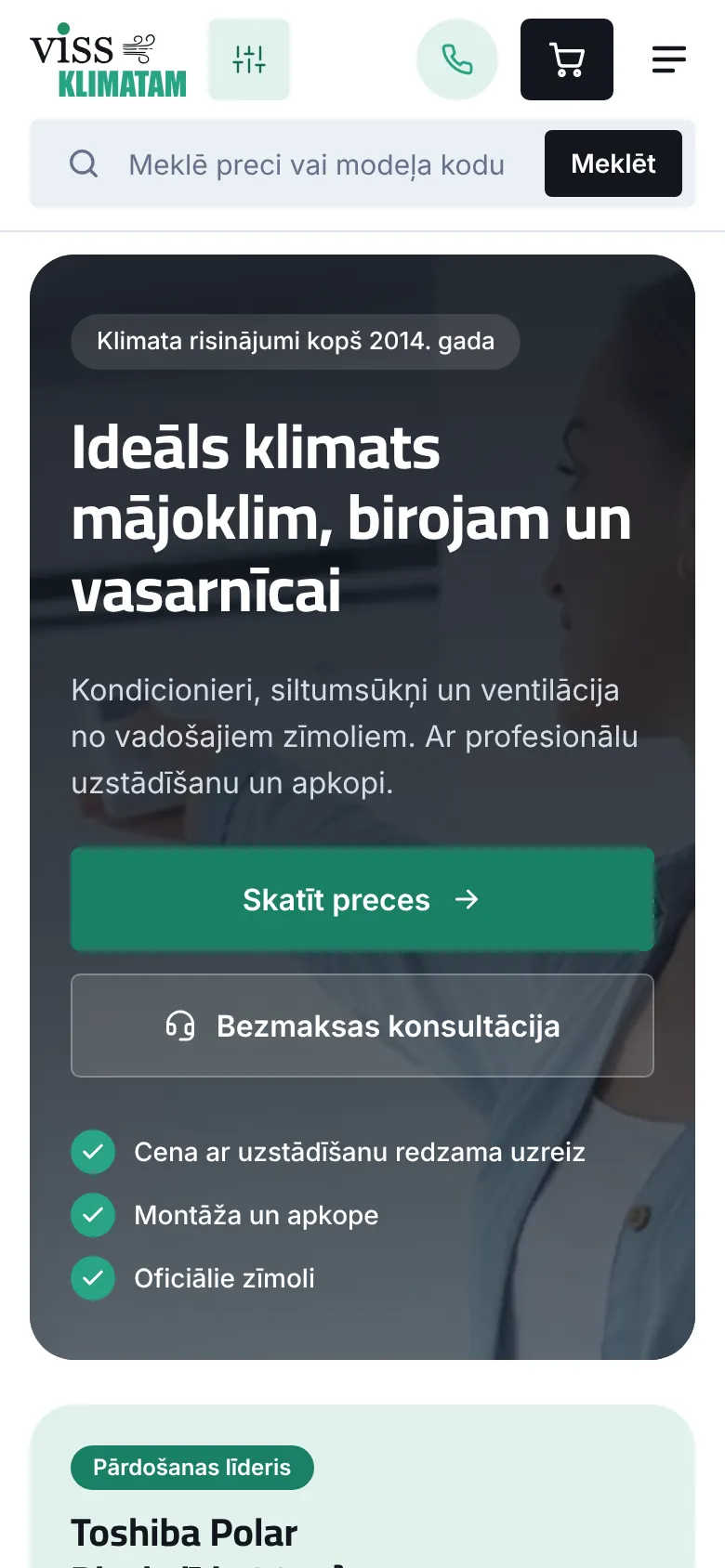
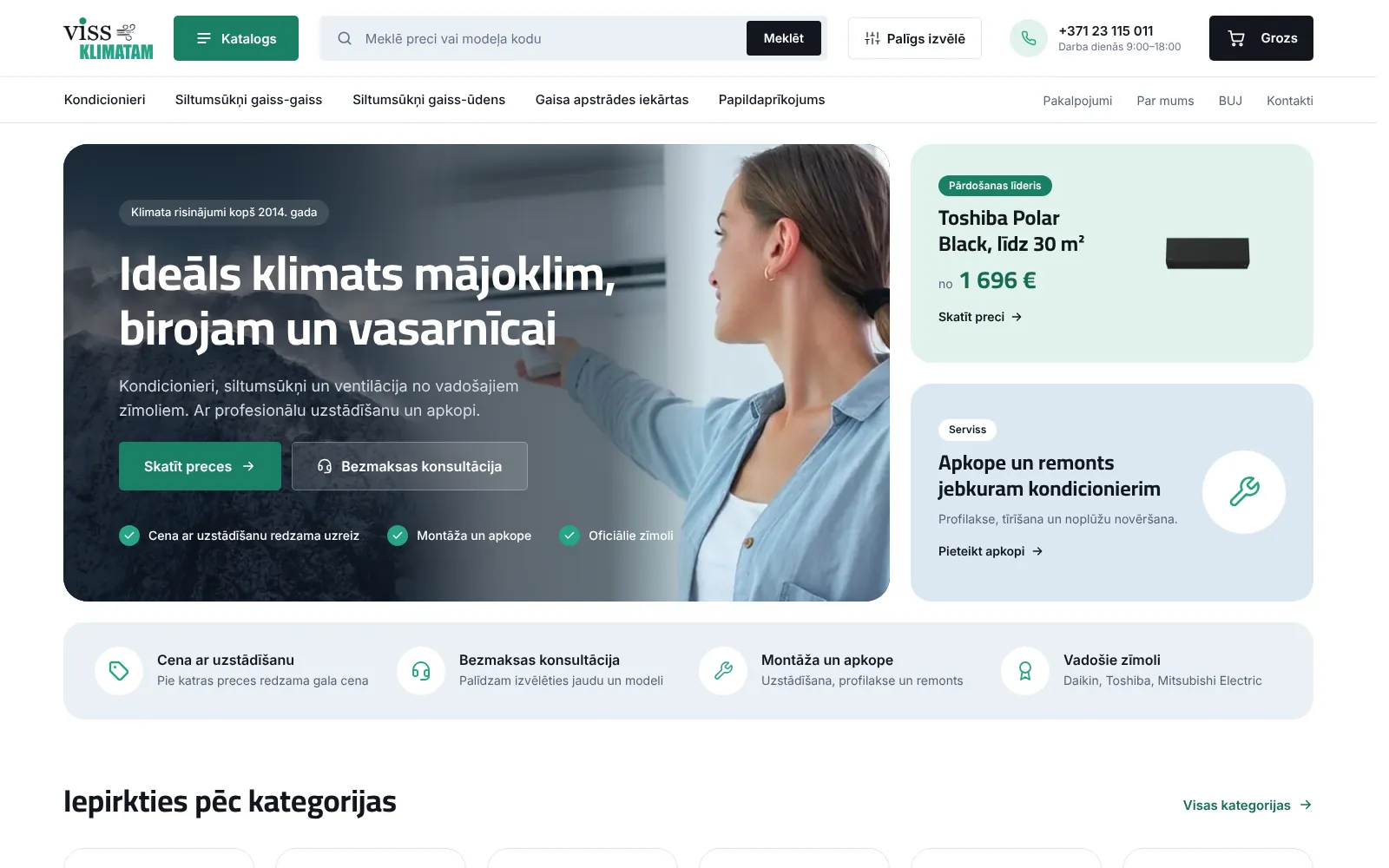
Customers recognised the Viss Klimatam site by its green colour, the logo with wind lines and the home page photo of a woman switching on an air conditioner with a remote. There was no reason to change that, so we offered the client a quick update with AI tools: keep the look and refresh it, but rebuild everything underneath.
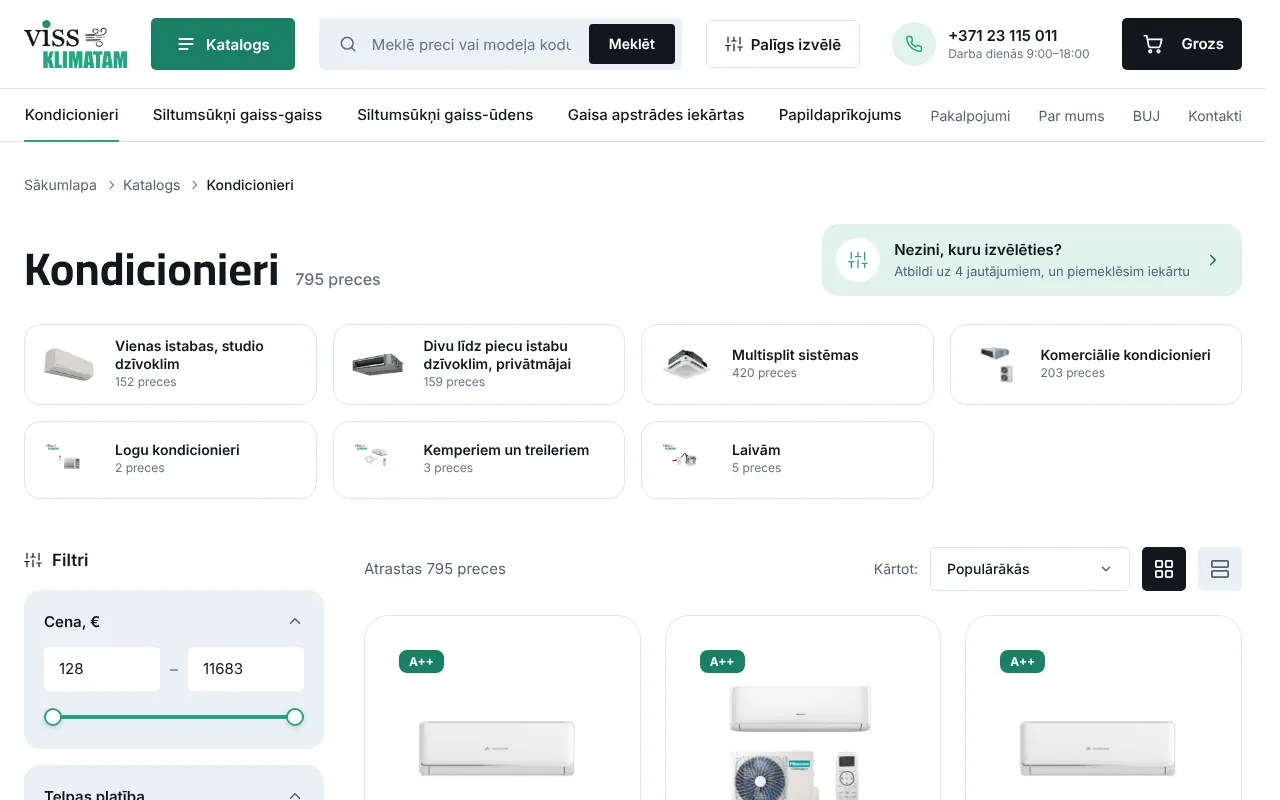
The catalogue was the biggest job. Air conditioners differ in power, type and noise level, a heat pump can heat one room or a whole house, and there are 795 air conditioners alone. A buyer usually knows how big the room is and whether they want to cool, heat or both, but not the output in kilowatts or the model code. The store had to help people choose rather than show a long list.
The second requirement was price. Air conditioners are bought together with installation, and buyers want the final amount before they call. The third was day-to-day ordering: company purchases, prepayment by bank transfer, invoices and order statuses.
Design: same identity, cleaner layout
We kept the logo, the green and the home page photo and changed how the pages are organised. The header now has a Catalogue button, a wide search field, the assistant button, the phone number with opening hours and the cart. Below it are the five main categories and links to services, FAQ and contacts. On the home page, next to the main photo, there is a best-seller card with a price and a service card, and below them four reasons to buy here: price with installation, free consultation, installation and maintenance, official brands.
We drew the changes in Figma: home page, catalogue with filters, product page and checkout, plus form error messages and order emails. On a phone the header keeps the assistant button, call button and cart, and search sits right under the logo.
The choice assistant: five questions and matching units
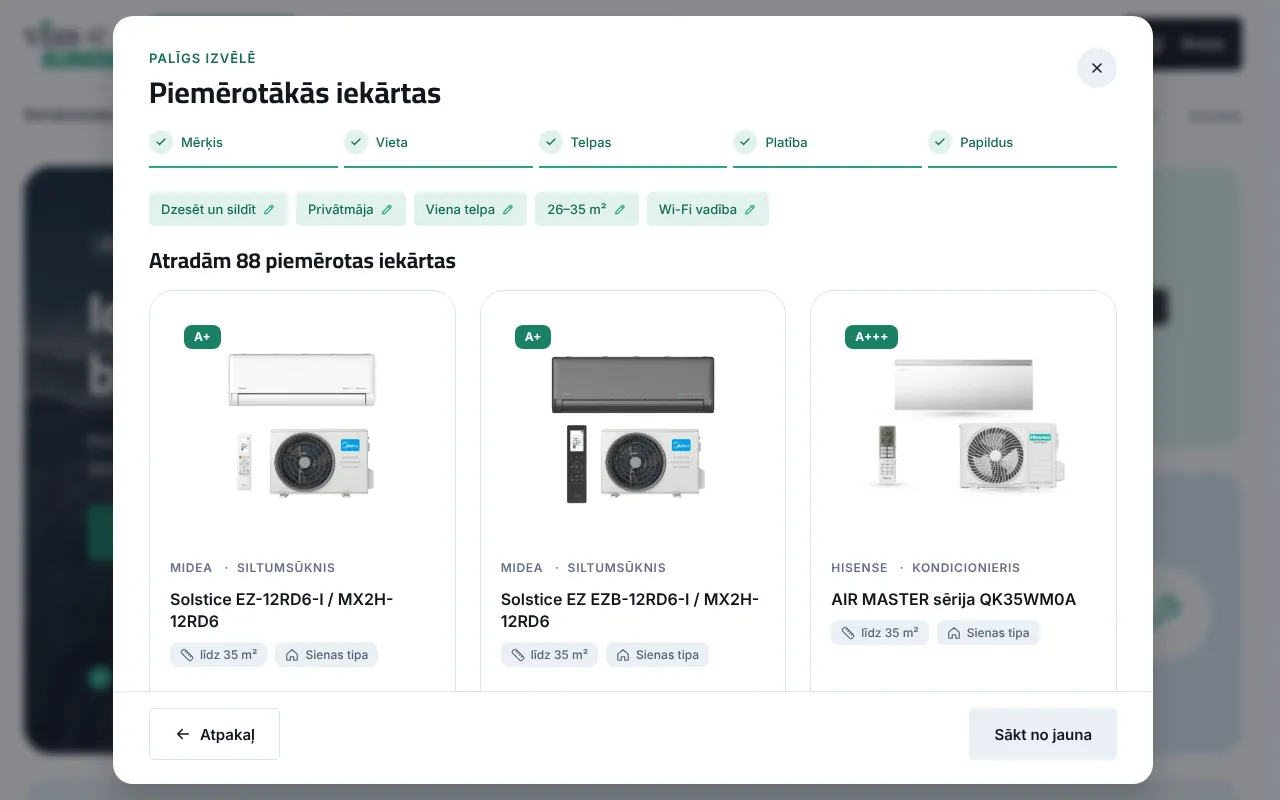
The assistant opens from the header, the mobile menu, the home page and the top of every category. It asks five questions, each answered with one tap:
- What do you want to do: cool, heat, both or ventilate.
- Where the unit will work: a flat, a private house, an office or shop, production or a warehouse.
- How many rooms: one, several or the whole house. The last option appears only for a private house when heating is needed.
- Room area: five ranges from “up to 25 m²” to “over 85 m²”, with a separate scale up to “over 250 m²” for a whole house.
- What else matters: Wi-Fi control, a quiet mode up to 22 dB for a bedroom, or a price with installation. This step can be skipped.
The assistant then picks the categories that match the goal, the place and the number of rooms. The store manager decides which categories fit which combination of answers in the settings, without a developer. It then filters products by area with up to 30% reserve upwards and sorts them: recommended products first, then those closest to the chosen area, then items on sale, then price. The buyer sees the six best matches with the price and the price with installation, the total number found and links to the categories with the area filter already applied.
Example on 31 October: “Cool and heat”, “Private house”, “One room”, “26-35 m²” and “Wi-Fi control”. The assistant finds 88 suitable units, and the first ones are Midea Solstice EZ heat pumps at €480.03, or €1014.78 with installation.
If nothing fits, the assistant does not show an empty screen. It offers to leave contact details so a specialist can find a unit. The same form sits under the results. The answers and the products shown go to the specialist with the request, so nobody has to ask again what is already known, and an offer with a capacity calculation and installation costs can be prepared straight away.
 Open the store
What changed in the store
- Catalogue and filters
- 1962 products in six main groups and 18 subcategories. Filters by price, area, brand, type, energy class, extra features, noise and colour run on a cached product index, so the list updates quickly without extra plugins.
- Search
- Search suggests products while you type and also finds them by model code or SKU, for example by the indoor unit code from a manual.
- Price with installation
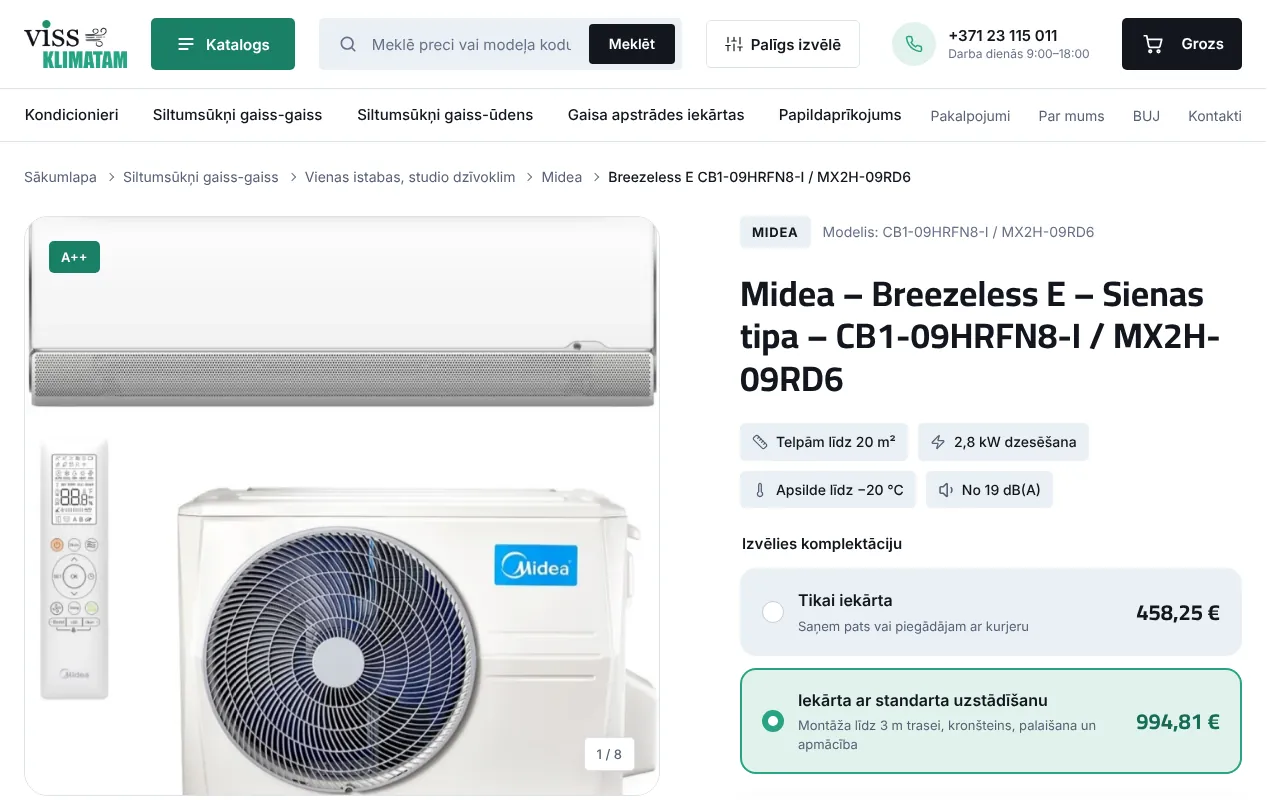
- For 536 products the product page shows the price with standard installation next to the regular price, what that installation includes, and extra work listed separately. A product with installation can go straight into the cart.
- Checkout
- Buyers choose whether they buy as a private person or a company, and company details fields appear for companies. Payment is via MakeCommerce or bank transfer, delivery by courier anywhere in Latvia or pickup.
- Invoices
- The store creates PDF invoices itself: a prepayment invoice for bank transfers, a VAT invoice with a sequential number and a credit note for refunds. They are attached to order emails, and buyers can download them too.
- Order emails
- All emails share one design and there are extra statuses “Shipped”, “Ready for pickup” and “Cancelled”. If a prepayment does not arrive on time, the buyer gets a reminder and the order is then cancelled automatically.
- Old addresses
- Products used to sit at the site root and now live under /prece/. Old product, category and page addresses such as /contacts/ and /faq/ redirect to the new ones with 301 redirects.
How AI made it faster
The speed in this project came from two decisions. First, the design did not have to be invented again, only refreshed. Second, we used AI tools for development. Our team planned the structure, the data fields and the assistant logic, while the theme code, the product migration and routine work such as redirects and email templates were done with AI. A developer checked every step, and only what we had tested ourselves went live.
Most of the time went into data. The assistant and the filters only work when the room area, noise level, Wi-Fi control and installation price are stored in separate fields rather than in the description. Today 640 products have an area, 721 have Wi-Fi control and 443 have a quiet mode up to 22 dB, and the store manager fills in new products the same way.
SEO and visibility
The rebuild could not undo what the store had already achieved in Google. So we redirected old addresses with 301 instead of leaving error pages. A redirect only kicks in when an address would otherwise return a 404, so it does not slow down existing pages.
Product meta descriptions contain the type, area, output, price and price with installation, for example “wall-mounted, for rooms up to 20 m², 2.8 kW. Price €458.25, with installation €994.81” (in Latvian on the site). Category descriptions include the product count. Rank Math builds the product structured data, and we switched off the WooCommerce duplicate so the page never has two different Product schemas. Aggressive scrapers that ignore robots.txt are refused, while Google, Bing and AI assistant search bots are not blocked, because they are needed for visibility. We wrote about how AI assistants decide what to recommend in GEO 2026: why ChatGPT recommends your competitor.
What we learned
Buyers think in square metres
Nobody searches for “2.8 kW”. People search for an air conditioner for a bedroom up to 20 m². That is why area appears in the filter, the assistant, the product card and the meta description.
An assistant is only as good as the data
Writing the questions is easy. The hard part is making sure every product has area, noise and installation price in its fields. The assistant cannot reliably suggest a product without that data, so cleaning the data was the largest part of the work.
If nothing fits, offer a person
A production hall or a server room often does not fit standard categories. In that case the assistant does not say “nothing found” but offers to send the answers to a specialist, so the enquiry is not lost.
What you can repeat in your store
- Keep the look customers already know and change what gets in the way of buying
- Store selection parameters such as area and noise in separate fields
- Show the final price with installation or delivery on the product page
- If you have many products, add a few questions that lead to suitable ones
- If the assistant finds nothing, offer to send the answers to a specialist
- Prepare 301 redirects before changing addresses
- Check that the Product schema does not appear twice on a page
Check for yourself
Everything you've read about is live. Open vissklimatam.lv and explore these sections yourself.
Frequently asked questions
Can an online store be updated without changing its design?
Yes. Viss Klimatam kept its logo, colours and main photo, while the catalogue, product page, checkout and emails were rebuilt. Buyers see a familiar store where finding and buying a product is easier.
How does the product choice assistant work?
The buyer answers five questions: goal, place, number of rooms, area and extra requirements. The assistant picks products from suitable categories by area and requirements, shows the best matches and the total number, and the answers can be sent to a specialist.
Does a store lose its Google rankings after an update?
Nobody can rule out fluctuations completely, but 301 redirects from old addresses to new ones and equally good or better titles and meta descriptions remove most of the risk. At Viss Klimatam old product, category and page addresses lead to the new ones.
Can an assistant like this be added to my WooCommerce store?
Often, yes. First we check whether product parameters are stored in fields or only in descriptions. If the data is in order, the assistant can be added to the existing store. If not, we start by organising the data.
How much does an online store update cost?
The price depends on the number of products, the state of the data and the features needed, so we set it after an audit. Online store package prices are on the E-commerce page, and for existing sites we start with a redesign and audit.
Want to update your online store?
Send us a link to your store and tell us what makes choosing hard for your customers. We will suggest what to keep and what to rebuild, and give a rough budget. Fill in the form or call +371 25 640 062. You can see the finished store in our portfolio.