A cookie banner is lawful when analytics and advertising cookies load only after the visitor clicks “Accept”, and the “Reject” button sits in the first layer and is just as visible as “Accept”. In Latvia the rule is Article 7.1 of the Information Society Services Law, which transposes Article 5(3) of the ePrivacy Directive, while the validity of consent is judged under the GDPR. On 17 January 2023 the European Data Protection Board (EDPB) taskforce concluded that pre-ticked boxes and a reject option hidden in a text link do not produce valid consent. You will not lose analytics entirely if Google tags run through Consent Mode v2, which Google has required since March 2024 from advertisers who want to keep ad personalisation and measurement in the EEA. GA4 models the missing data only for sites with at least 1,000 events a day from visitors who refused analytics, so for a small business the main figure is still the orders and enquiries recorded in its own system. This article is not legal advice. It shows what the requirements look like on the page and in the code.
Latest on cookie rules
- 01.12.2026
- Amendments to the Latvian Information Society Services Law, adopted by the Saeima on 29 October 2026, take effect. They do not change the cookie article 7.1, so the requirements in Latvia stay the same.
- 21.10.2026
- The EU Council agrees its position on the Digital Omnibus. Cookie rules stay in the ePrivacy Directive, with extra cases where no consent is needed, such as providing a service, measuring audiences and protecting the device. The European Parliament has not adopted its position yet, so none of this is in force.
- 19.11.2025
- The European Commission proposes the Digital Omnibus: one-click refusal, no repeat request for the same purpose for at least 6 months, and choices that the browser can send automatically. This is a proposal.
- 07.10.2024
- The EDPB adopts the final Guidelines 2/2023: Article 5(3) of the ePrivacy Directive also covers tracking pixels, URL tracking and tracking based on the IP address alone.
- 18.01.2024
- Google announces that advertisers with EEA visitors must send the new ad_user_data and ad_personalization signals by March 2024 to keep ad personalisation.
When a cookie needs consent
Article 7.1 of the Latvian law allows storing information on a user’s device, or reading it from there, only with consent given after clear information about the purpose. The exception is what is needed to deliver a service the user asked for: a shopping cart, logging into an account, a language choice, and storing the cookie choice itself. Analytics and advertising do not fall under this exception. In the Data State Inspectorate (DVI) guidelines on cookies (2022), analytics cookies need consent before processing, and only clicking the “I agree” button counts as consent. Scrolling or continuing to use the page does not.
The rule is not limited to cookies. In EDPB Guidelines 2/2023 (final version of 7 October 2024), Article 5(3) of the ePrivacy Directive also covers tracking pixels, identifiers appended to the page address and tracking based on the IP address alone. The Meta pixel, the LinkedIn Insight Tag and the Google Ads conversion tag belong to the same group as GA4. In the Planet49 case (1 October 2019) the Court of Justice of the EU ruled that a pre-ticked box is not valid consent, whether or not the information stored on the device is personal data.
Withdrawing consent must be as easy as giving it (GDPR Article 7(3)). On a website this is usually a footer link or a small button in a corner of the screen that reopens the same choice.
What a compliant cookie banner looks like
On 17 January 2023 the EDPB cookie banner taskforce summarised which banner practices European data protection authorities treat as infringements. Valid consent does not come from a banner with no way to refuse in the first layer, a second layer with pre-ticked boxes, a reject option that is only a link inside the text, or a “Reject” button with text so pale it is barely readable. Pointing to “legitimate interests” does not work either: the taskforce writes that the basis for cookies “cannot be the legitimate interests of the controller”. There is no single colour or contrast standard and authorities assess each banner on its own, so the safest design is two buttons of the same size and style.
The DVI guidelines say the first layer must state who the controller is, what the cookies are used for, whether they are first or third party, whether profiling takes place and how to accept, configure or refuse them. It also needs a link to the cookie policy. In the DVI sample, the “I do not agree” and “I agree” buttons sit side by side.
A banner is also an interface element that people use with a keyboard and a screen reader. Marcus Herrmann, writing in Smashing Magazine (24 April 2023), notes that inaccessible cookie notices “have the potential to violate web accessibility laws as well”. The usual faults are buttons built from div elements that Tab cannot reach, category checkboxes without labels, and a dialog that lets focus drift to the page behind it. We covered what the European Accessibility Act requires from an online store in our article on the Accessibility Act in Latvia.
Google Consent Mode v2: Basic and Advanced
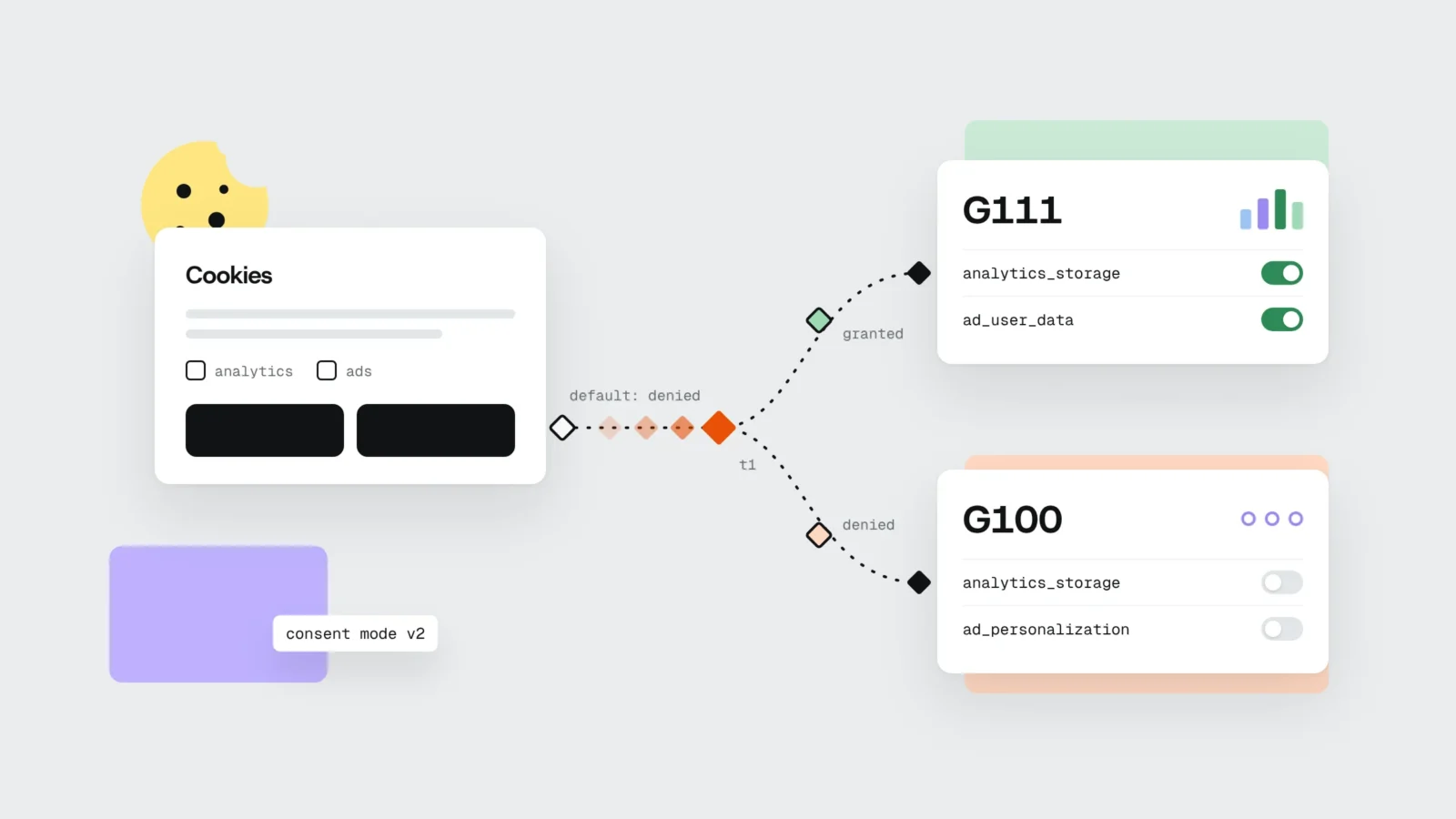
Consent Mode is how Google tags learn the visitor’s choice. Four signals matter for ads and analytics: analytics_storage (analytics cookies), ad_storage (advertising cookies), ad_user_data (whether user data may be sent to Google for advertising) and ad_personalization (personalised ads, including remarketing). Google added the last two ahead of EU regulatory changes and announced on 18 January 2024 that advertisers had to implement them by March 2024 to keep ad personalisation in the EEA.
Consent Mode comes in two modes. In Basic mode, Google tags do not load until the visitor has made a choice. If the visitor refuses, Google receives nothing, Google Ads models conversions with a general model, and GA4 does not model data at all. In Advanced mode, tags load straight away with the default set to “denied”. If the visitor refuses, no cookies are written, but Google receives the consent state and cookieless measurements (browser, referrer, time). From these, Google Ads builds a model for that specific advertiser, and GA4 can model visitor behaviour.
Advanced gives more data, but legally it is the more contested option: a cookieless measurement still reads information from the browser, and EDPB Guidelines 2/2023 apply Article 5(3) to pixels and URL tracking too. Our view: a site without large ad campaigns is fine with Basic. Advanced is worth considering when the Google Ads budget is large and the company’s lawyer or data protection officer has assessed it. In both modes the tag must not write cookies before the choice, and you can check this in the browser (see the check below).
If the banner comes from a Google-certified consent management platform (CMP), it sends the Consent Mode signals itself. If the banner is custom-built or comes from a WordPress plugin without Consent Mode support, the signals have to be wired up in code or in Google Tag Manager.
What happens to GA4 data when a visitor refuses
If analytics_storage is “denied”, GA4 does not see that visit as a user with a session. In Basic mode it disappears entirely. In Advanced mode GA4 receives a cookieless measurement and can fill the gap with behavioural modelling, but only if the site has received at least 1,000 events a day with analytics refused for at least 7 days, and at least 1,000 daily users with consent on 7 of the previous 28 days. Even then Google does not guarantee modelling. Modelled data shows up when you select the “Blended” reporting identity, and it is not available in audiences, segments or BigQuery export.
A site with 300 visitors a day does not reach these thresholds, so GA4 will show only the people who agreed. A drop in GA4 after switching to a fair banner is usually a drop in measurement, not in sales. On the advertising side, “denied” ad_user_data also switches off enhanced conversions and user_id, and “denied” ad_personalization means the visitor is not added to remarketing lists.
What else to measure while Google sends fewer clicks and more searches end in AI answers is covered in our article on what a small business should measure in AI search.
What you can measure without consent
Several of the most important numbers do not depend on cookies:
- Orders, enquiries and calls in your own system: WooCommerce, the CRM, the inbox. They are complete, and they are the actual result.
- Google Search Console: impressions, clicks and queries in Google Search. The data comes from Google’s side, not from tags on your site.
- Hosting statistics. They count server requests including bots, so they are rough. Why they differ from GA4 by 5-10 times is explained in our article on bots and AI crawlers.
- Google Ads conversions, where Consent Mode lets modelling fill part of the gap.
Analytics tools marketed as “cookieless” do not automatically remove the need for consent. Under the EDPB guidelines Article 5(3) also applies to reading information without cookies, and the DVI guidelines require consent for analytics. The Digital Omnibus proposal includes an exemption for aggregated audience measurement carried out by the site owner itself, and the Council supports it. If it is adopted, measurement will become much easier for small sites, but for now that is a forecast and the current law applies.
One thing you can do without a lawyer is run fewer tags. Every analytics and advertising script also slows the page on a phone, as we described in our article on the two seconds after a page opens.
Example: a garden supplies online store in Cēsis
Suppose a garden supplies online store in Cēsis has about 9,000 visits a month (300 a day), 140 orders a month and a Google Ads budget of €600 a month. Its banner had a large orange “Accept all” button and a grey “Settings” link where refusing took three clicks, and GA4 loaded before any choice. GA4 showed 131 of the 140 orders.
After the fix the banner has two buttons of the same size, the second layer has three categories with no pre-ticked boxes, and the footer has a “Cookie settings” link. Google tags run through Consent Mode v2 in Basic mode. About 55% of visitors agree, and GA4 now shows about 77 orders a month, because the store cannot reach the modelling thresholds. WooCommerce still records about 140 orders, and revenue has not changed.
So the store no longer judges campaigns by absolute GA4 numbers. It compares advertising by ratios: WooCommerce orders against Google Ads spend week by week, and GA4 channel shares only among the visitors who agreed. In Google Ads conversions, general modelling fills part of the gap. This takes one report table and about 20 minutes a week.

A 15-minute check
- Open the site in a private window (Chrome Incognito) and do not click anything yet.
- Open the developer tools (F12), the Application tab, the Cookies section. Before any choice there must be no _ga, _gcl_au, _fbp or similar analytics or advertising cookies.
- In the Network tab, type “collect” into the filter. In Basic mode there are no requests to google-analytics.com before the choice. In Advanced mode there are, but the gcs parameter must read G100 (both storage types “denied”).
- Check the banner itself: is “Reject” in the first layer and as large as “Accept”, and are there no pre-ticked boxes in the second layer?
- Click “Reject”, reload the page and repeat steps 2 and 3. The cookies must stay away after the reload too.
- Find the link in the footer or a screen corner that lets you change the choice, and check that withdrawal works.
- Go through the banner with the keyboard: Tab reaches each button, Enter presses it, and focus stays in the banner while it is open.
- Open the cookie policy and check that it lists every cookie with its purpose, retention period and the third party that receives it.
What to check this week
- Analytics and advertising tags do not load before the choice
- “Reject” in the first layer, as visible as “Accept”
- No pre-ticked boxes in the second layer
- A footer link that lets visitors change their choice
- Google tags connected through Consent Mode v2 with all four signals
- The cookie policy lists every cookie with purpose and retention period
- The banner works with a keyboard and a screen reader
- Results counted in WooCommerce or the CRM, not only in GA4
Frequently asked questions
Do I need a cookie banner if the site only uses Google Analytics?
Yes. GA4 writes analytics cookies, and the DVI guidelines require consent for analytics before processing. A banner is unnecessary only if the site uses nothing but strictly necessary cookies, for example for the cart, account login or language choice.
Can I write «By continuing to use this site you agree to cookies»?
No. Consent is an active step. In the DVI guidelines it means clicking the “I agree” button, and scrolling or using the page does not count.
Basic or Advanced Consent Mode: which should I choose?
Basic is simpler and legally less contested, because Google receives nothing until the choice. Advanced gives more modelling but sends measurements without consent. A small site is usually fine with Basic; assess Advanced with a lawyer if your Google Ads budget is large.
Why does GA4 show 40% fewer visitors after the new banner?
GA4 counts only the people who agreed. Modelling starts only above 1,000 events a day from those who refused and 1,000 daily users with consent, which small sites do not reach. Compare GA4 with the orders or enquiries in your own system.
Will the Digital Omnibus abolish cookie banners?
No, and it has not been adopted. The Commission’s proposal of 19 November 2025 includes one-click refusal, 6 months without a repeat request and browser signals. The Council agreed its position on 21 October 2026, while Parliament is still working in committee. Until adoption the current law applies.
Who supervises cookies in Latvia, and what are the fines?
Personal data processing is supervised by the Data State Inspectorate, and the Information Society Services Law also names the Consumer Rights Protection Centre as a supervisor. The highest GDPR fine is €20 million or 4% of worldwide annual turnover, whichever is higher.
If your banner loads analytics before the choice
As part of website maintenance we check which tags load before the choice, fix the banner, connect Google tags through Consent Mode v2 and set up Google Ads conversions so ad reports keep working after refusals. See website maintenance and Google Ads management, or send us your site address and we will tell you which cookies it writes before consent. Phone: +371 25 640 062.
Sources
- likumi.lv: Information Society Services Law (Informācijas sabiedrības pakalpojumu likums), Article 7.1
- likumi.lv: Amendments to the Information Society Services Law (29.10.2026, in force from 01.12.2026)
- EUR-Lex: Directive 2002/58/EC (ePrivacy Directive), Article 5(3)
- EUR-Lex: General Data Protection Regulation (EU) 2016/679, Articles 4, 7 and 83
- Data State Inspectorate of Latvia: Guidelines on the use of cookies on a website (2022) and cookie policy template (in Latvian)
- EDPB: Report of the work undertaken by the Cookie Banner Taskforce (17.01.2023)
- EDPB: Guidelines 2/2023 on Technical Scope of Art. 5(3) of ePrivacy Directive, version 2 (07.10.2024)
- Court of Justice of the EU: Press release No 125/19, Case C-673/17 Planet49 (01.10.2019)
- Google for Developers: Consent mode overview
- Google Analytics Help: Consent mode on websites and mobile apps
- Google Analytics Help: [GA4] Behavioral modeling for consent mode
- Shirin Eghtesadi, Google Ads: Adapt to privacy and regulatory changes with consent mode (18.01.2024)
- Google Ads Help: Updates to consent mode for traffic in European Economic Area (EEA)
- European Commission: Digital Omnibus Regulation Proposal (19.11.2025)
- European Parliament, Legislative Observatory: 2025/0360(COD) Digital Omnibus
- EU Council press release on the Digital Omnibus, 21.10.2026 (EuropaWire reprint)
- Marcus Herrmann, Smashing Magazine: The Potentially Dangerous Non-Accessibility Of Cookie Notices (24.04.2023)