If enquiries from your website form or order confirmations from your online store land in spam or never arrive, the cause is usually the sending route, not the wording. By default WordPress sends through the server’s PHP mail() function from wordpress@ on your domain, and the receiving server has no way to check whether your domain allows that server to send for it. Since February 2024 Gmail and Yahoo have required every sender to use at least SPF or DKIM, and senders of around 5,000 or more messages a day to add DMARC as well. Outlook.com has applied the same rules to high-volume senders since 5 May 2025, and since November 2025 Gmail has been rejecting non-compliant mail with error codes more often. The fix is three DNS records (SPF, DKIM and DMARC) plus sending through SMTP or an email API that signs messages with your domain. It takes a few hours, and you can check the result in 10 minutes.
Latest on email sender requirements
- 05.2026
- The new DMARC standard RFC 9989 was published, replacing RFC 7489 and RFC 9091. Records still start with v=DMARC1, but the pct tag is gone, testing now uses t=y, and the organisational domain is found with a DNS tree walk instead of the Public Suffix List. Reporting is described in separate standards, RFC 9990 and RFC 9991.
- 11.2025
- Gmail ramps up enforcement: messages that do not meet its sender guidelines get temporary or permanent rejections.
- 05.05.2025
- Outlook.com (including hotmail.com and live.com) starts requiring SPF, DKIM and DMARC from domains sending more than 5,000 messages a day. Rejected messages get the code 550 5.7.515.
- 01.02.2024
- Gmail and Yahoo introduce their rules: SPF or DKIM for every sender, and SPF, DKIM, DMARC and one-click unsubscribe for bulk senders’ marketing mail.
Why form and order emails end up in spam
A message from your website takes a different route from one you write in Outlook or Gmail. When a visitor presses “Send”, WordPress calls wp_mail(). It uses the PHPMailer library, which by default hands the message to the server’s PHP mail() function, with wordpress@ on your domain as the sender. The hosting server sends it from its own IP address, which is usually not listed in your domain’s SPF record, and the message carries no DKIM signature for your domain.
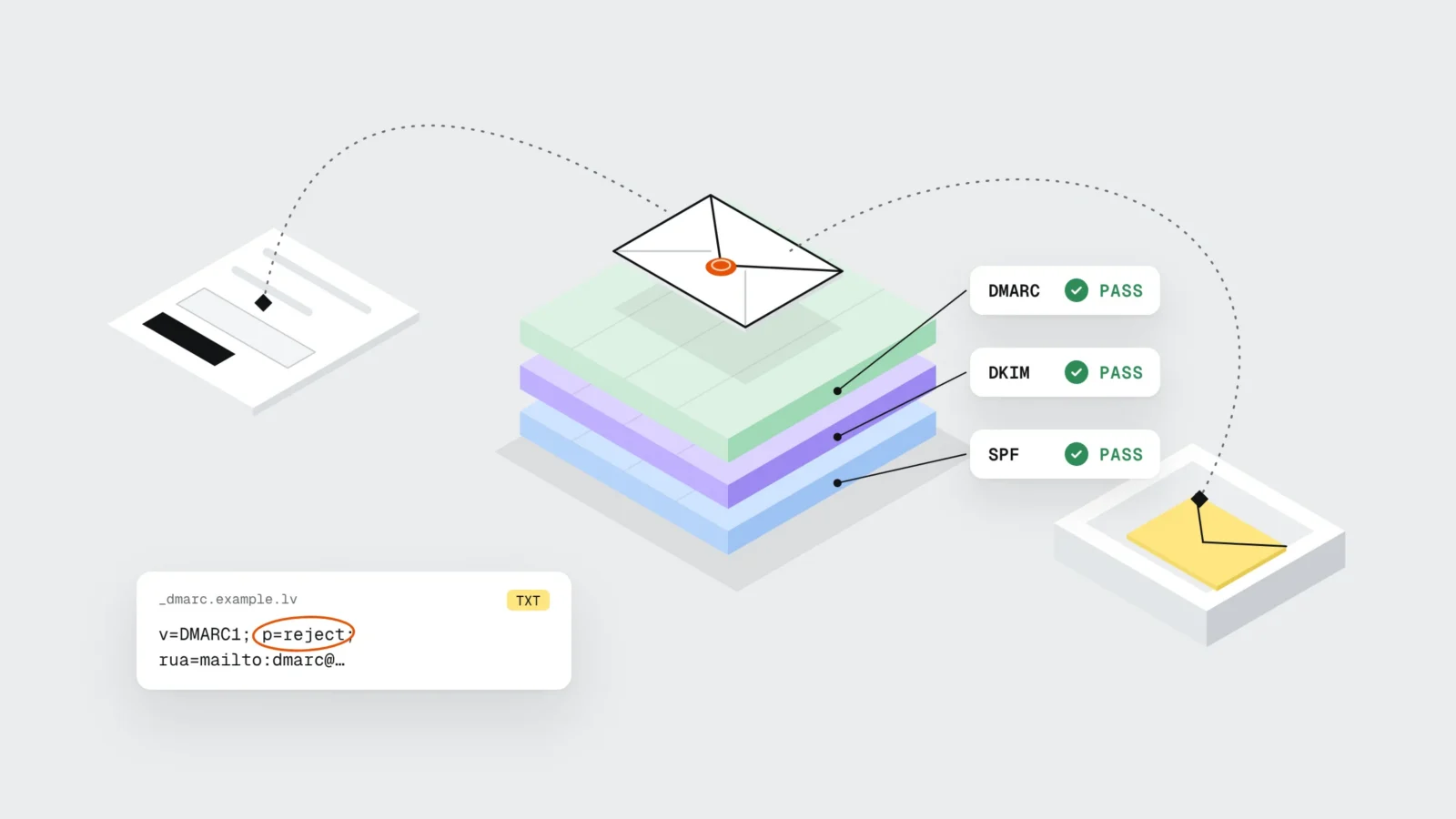
The receiving server, Gmail for example, checks three things: whether the sending server is allowed (SPF), whether the message is signed and unchanged in transit (DKIM), and whether both results belong to the same domain the recipient sees in the “From” field (DMARC). When the checks fail, the message goes to spam or is rejected. The WordPress documentation notes that wp_mail() returning “true” does not mean the email was received. So the form says “Thank you, message sent” while the email can still disappear along the way.
This is often noticed only when a customer calls to ask why nobody replied. The form plugin does not know what happened to the message after the server accepted it, and rejections are usually not logged anywhere.
What Gmail, Yahoo and Outlook require in 2026
The big mailbox providers publish their rules, and for a small business the first group matters most because it applies to every sender regardless of volume. Gmail’s guidelines list five rules for all senders:
- SPF or DKIM for your sending domain;
- valid forward and reverse DNS (PTR) records for the sending server;
- a TLS connection when sending;
- a spam complaint rate in Postmaster Tools below 0.3%;
- messages formatted according to RFC 5322.
If you send around 5,000 or more messages a day to personal Gmail accounts, you need SPF and DKIM together, a DMARC record (the policy may be none), a “From” domain aligned with the SPF or DKIM domain, and one-click unsubscribe in marketing messages. Gmail’s bulk sender status does not expire: once you reach it, the rules stay even if your volume drops. Yahoo asks for the same: SPF or DKIM for everyone, both plus DMARC with at least p=none for bulk senders. Microsoft Outlook.com requires SPF, DKIM and DMARC from domains sending more than 5,000 messages a day and has been rejecting unauthenticated mail from them since 5 May 2025.
Announcing the rules in October 2023, Neil Kumaran, who leads Gmail security product management, wrote: “Starting in 2024, we’ll require bulk senders to authenticate their emails”. Form emails are rarely bulk mail, but they pass through the same filters. Gmail’s help page lists the consequence for each unmet requirement: a temporary or permanent rejection, or the spam folder. The temporary codes are specific: 4.7.27 points to SPF, 4.7.30 to DKIM, and 4.7.32 appears when the “From” domain does not align with authentication.
SPF: which servers may send for your domain
SPF is a single TXT record in your domain’s DNS that lists the servers allowed to send email on your domain’s behalf. The standard is RFC 7208 (April 2014). For a company whose mailboxes are on Google Workspace and whose website sends through Mailgun, the record looks like this:
v=spf1 include:_spf.google.com include:mailgun.org ~all
The ~all at the end gives every other server a “softfail” result. The stricter -all is for when you are sure the list includes every sender. The three most common mistakes:
- A domain may have only one SPF record. If your accounting software or newsletter service adds a second one, the check ends in an error (permerror) for all mail, including your office mailboxes.
- A record may contain no more than 10 mechanisms that need a DNS lookup (include, a, mx, ptr, exists and redirect), and each include can contain more of its own.
- SPF checks the technical sender address (Return-Path), which people never see. It does not check the “From” address; DMARC is what ties the two together.
DKIM: a signature the recipient can verify
DKIM (RFC 6376, September 2011) adds a digital signature to each message. The sending service signs the headers and body with a private key, and the public key sits in your DNS under the name selector._domainkey.yourdomain.com. The recipient reads the key, verifies the signature and knows the message really comes from your domain and was not altered on the way.
Whoever sends the mail generates the key: Google Workspace and Microsoft 365 in their admin consoles, an email API service in its settings, your host in its email section. Each sender has its own selector, so one domain can have several DKIM records, and that is normal. Yahoo recommends keys of at least 1024 bits; if the console offers 2048 bits, choose that. After adding the record you still have to switch signing on in the console, otherwise the record exists in DNS while messages keep going out unsigned.
DMARC: the rule that ties it all together
DMARC is a TXT record at _dmarc.yourdomain.com. It tells the recipient two things: what to do with a message that claims to come from your domain but fails the checks, and where to send reports. A message passes DMARC when SPF or DKIM passes and that domain matches the domain in the “From” field. This alignment is what the first two checks do not do on their own.
There are three policies: p=none (monitor and receive reports), p=quarantine (send suspicious mail to spam) and p=reject (refuse it). A first record usually looks like this:
v=DMARC1; p=none; rua=mailto:dmarc@yourdomain.com
Mailbox providers send aggregate reports in XML to the rua address, usually once a day. They show which IP addresses sent mail in your name and whether SPF and DKIM passed. In the first weeks they typically reveal senders nobody remembered: invoicing software, a newsletter service, an office printer that scans to email. Once every legitimate sender passes, you move the policy to quarantine and then to reject. While the policy is none, anyone can send mail with your domain in the “From” field and DMARC will not stop it.
If your existing record contains pct=100, it does no harm: the new standard tells receivers to ignore unknown tags. New records leave pct out, and gradual rollout uses t=y.
WordPress: an SMTP plugin and the right form settings
Your website should send through a mail service that is listed in your domain’s SPF and DKIM records. There are two routes: a company mailbox (Google Workspace, Microsoft 365 or your host’s email) over SMTP, or an email API service (Amazon SES, Mailgun, Brevo, Postmark), which is the better choice when an online store sends many order and password reset emails. On the WordPress side an SMTP plugin does the job. FluentSMTP, for example, has more than 700,000 active installations (latest version 2.4.5 from 4 November 2026), connects to all the services above, keeps a log of sent emails with the server’s response and can switch to a backup connection if the main one fails. The plugin holds access to your email, so choose it like any other plugin: updated, widely used and connected with an API key instead of a password (we covered plugin risks in our article on WordPress plugins as a security risk).
After installing the plugin, check your form settings. The “From” field should hold an address on your domain, for example form@yourdomain.com, and the visitor’s address belongs in “Reply-To”. When you press “Reply”, the email still goes to the customer, and the DMARC check passes.
If a visitor typed an @yahoo.com address and the form puts it in “From”, your server is sending mail in Yahoo’s name. The DMARC policy for yahoo.com is p=reject (we checked on 21 November 2026), so the recipient may reject that message even when your own SPF and DKIM are fine. gmail.com currently uses p=none, which is why the error shows up less often with Gmail addresses and goes unnoticed for longer.
Check your WooCommerce emails too: order confirmations, invoices and password resets. They go through the same wp_mail(), so the SMTP plugin picks them up automatically, but the sender name and address are set separately in the WooCommerce “Emails” settings.
Example: a plumbing supplies online store in Jelgava
Say a plumbing supplies online store in Jelgava gets about 35 orders a day, and many buyers are tradespeople ordering from their phones on the way to a job. Order confirmations go out through the server’s mail() from wordpress@, the office uses Google Workspace, invoices are sent by the accounting software, and the DNS holds two SPF records: one from the host and one from the accounting software. Because there are two records, SPF fails for every message, office mail included. Every week 4-6 buyers call to ask whether their order came through, because they cannot find the confirmation.
The fix takes two working hours and a few weeks of monitoring. Both SPF records are merged into one covering Google Workspace, the email API service and the accounting software. DKIM is switched on for Google Workspace and the email API service. WooCommerce and the contact form send through an SMTP plugin from an info@ address, with the customer’s address in “Reply-To”. DMARC goes in with p=none and rua reports.
Three weeks later the reports show one more sender: the warehouse software that tells tradespeople when an order is ready. It is added to the SPF record and gets DKIM, after two more clean weeks the policy moves to quarantine, and a month later to reject. Calls about missing confirmations drop to 0-1 a week, and the SMTP plugin log shows every confirmation with the server’s response. The store is small, so the bulk sender rules do not apply to it, but the Gmail and Yahoo rules for all senders do. In our online store launch checklist the email check is a single line, and this example shows why it is worth doing before the first order.

A 10-minute check
- Fill in your contact form and place a test order with a Gmail address, then again with an Outlook.com address.
- Open the email in Gmail and choose “Show original” from the menu next to “Reply”. The top lines show SPF, DKIM and DMARC: all three should say PASS.
- On the same page check that the SPF and DKIM lines mention your domain, not the hosting server’s name.
- Enter your domain in the MXToolbox SPF and DMARC lookups: there should be one SPF record with no more than 10 DNS lookups, and a DMARC record should exist.
- In your form settings check the “From” field (an address on your domain) and “Reply-To” (the visitor’s address).
- In WooCommerce settings check the sender name and address for all emails.
- In the SMTP plugin log make sure last week’s emails were sent without errors.
- After two weeks open the first DMARC reports and list any senders you do not recognise.
What to do this week
- One SPF record that covers every sender
- No more than 10 DNS lookups in the SPF record
- DKIM on for your mailboxes, email API and every other sender
- A DMARC record with rua reports
- The website sends through an SMTP plugin instead of the server’s mail()
- An address on your domain in “From”, the visitor in “Reply-To”
- WooCommerce emails tested in Gmail and Outlook
- After 4-6 weeks a DMARC policy of quarantine, then reject
Frequently asked questions
Do I need DMARC if my website sends only a few emails a day?
Gmail and Yahoo make DMARC mandatory only for bulk senders, but it is the only way to see who sends mail in your domain’s name and to stop others from spoofing it. A p=none record blocks nothing and starts the reports coming, so it is worth adding for any business domain.
Can a domain have two SPF records?
No. If there is more than one SPF record, RFC 7208 makes the check end in an error (permerror). All senders have to be combined into one record with several include entries.
Does an SMTP plugin fix the spam problem by itself?
Partly. The plugin sends through a real mail server, but the SPF, DKIM and DMARC records still have to be added to your DNS, and the form’s “From” field must use your own domain. Without that, messages can land in spam even over SMTP.
What do the errors 550 5.7.515 and 4.7.27 mean?
550 5.7.515 is the Outlook.com rejection for a sending domain that does not meet its authentication requirements. Gmail’s temporary code 4.7.27 points to an SPF problem, 4.7.30 to DKIM, and 4.7.32 means the “From” domain does not align with the SPF or DKIM domain. You will find the code in the bounce message or in the SMTP plugin log.
Can p=reject block my own legitimate emails?
Yes, if a legitimate sender is not yet in your SPF record or does not sign with DKIM. That is why you start with 2-4 weeks of p=none and reports, then quarantine, and switch to reject only when the reports no longer show unknown senders.
Do I need to change hosting if emails land in spam?
Usually not. The website can send through your company mailbox or an email API service while the hosting stays the same. Hosting is worth changing for other reasons, such as speed, which we covered in what happens in the two seconds after a customer opens your website.
If enquiries go missing and nobody knows where
As part of website maintenance we check your domain’s SPF, DKIM and DMARC records, set up an SMTP plugin, send test emails to Gmail and Outlook and follow the DMARC reports until the policy can be moved to reject. See website maintenance or send us your domain and which emails are not arriving, and we will tell you which of the three checks is failing. Phone: +371 25 640 062.
Sources
- Google: Email sender guidelines (Gmail Help)
- Google: Email sender guidelines FAQ (enforcement from November 2025, error codes)
- Neil Kumaran, Google: New Gmail protections for a safer, less spammy inbox (3 October 2023)
- Yahoo Sender Hub: Sender Requirements & Recommendations
- Microsoft: Strengthening Email Ecosystem: Outlook’s New Requirements for High-Volume Senders (2 April 2025, updated 30 April 2025)
- RFC 7208: Sender Policy Framework (SPF), 2014
- RFC 6376: DomainKeys Identified Mail (DKIM) Signatures, 2011
- RFC 9989: Domain-Based Message Authentication, Reporting, and Conformance (DMARC), 2026
- RFC 9990: DMARC Aggregate Reporting, 2026
- WordPress Developer Resources: wp_mail()
- WordPress.org: FluentSMTP plugin
- Gmail Help: Trace an email with its full header