Black Friday 2026 falls on 27 November and Cyber Monday on 30 November. If an online store in the EU announces a discount, it must show the prior price next to it, and the prior price is the lowest price you charged for that product in the 30 days before the reduction. The percentage is calculated from that price, so a crossed-out “regular price” only works if the product was never cheaper during the month. The rule has applied since 28 May 2022 (Article 6a of the Price Indication Directive; in Latvia, point 14.1 of Cabinet Regulation No. 178), and in 2024 the EU Court of Justice confirmed that it also covers percentages and advertising claims that stress a bargain price. After the 2025 campaign, Latvia’s Consumer Rights Protection Centre (PTAC) checked 27 online stores: of the discounts that did show a 30-day price, 41.6% were not calculated from the lowest one. Below: how to write it on a product card, the exceptions, what the law says about countdown timers and how to set it up in WooCommerce.
Latest on how discounts must be shown
- 11.11.2026
- The European Commission proposed the Digital Fairness Act. It would ban manipulative online tactics such as false claims that a product is nearly sold out. It is a proposal that the European Parliament and the Council still have to negotiate, so it does not change the rules for this year’s Black Friday.
- 09.06.2026
- PTAC updated its price indication guidelines (No. 5): a discount should not run longer than a month and is not extended (clearance sales excepted), a clearance sale must state its reason, and for “up to …% off” the largest discount must apply to at least 10% of the products.
- 26.03.2026
- The European Commission and consumer authorities from 25 countries published their Black Friday and Cyber Monday check: of 314 online traders, 30% stated discounts incorrectly and 18% used pressure such as “almost sold out” claims or countdown timers.
- 28.01.2026
- PTAC published the results of its 2025 Black Friday check: 27 online stores, 1,327,154 offers, 121,420 discounted products, and only 36% of them showed the 30-day price.
Which price counts as the “was” price
The rule comes from Article 6a of Directive 98/6/EC, added by the Omnibus Directive 2019/2161: any announcement of a price reduction must indicate the prior price, meaning the lowest price the trader applied during at least 30 days before the reduction. Latvia wrote it into Cabinet Regulation No. 178 on price indication, in force from 28 May 2022, with the same 30-day period. The same directive also tightened the rules on fake reviews, which we covered in the article on Google reviews.
In practice what matters is the lowest price, not the usual one. If a product cost 129 € at the start of November, was on offer at 99 € for a week and then went back to 129 €, its prior price on Black Friday is 99 €, even though it sold at the higher price for most of the month.
In case C-330/23 (Aldi Süd, 26 September 2024) the EU Court of Justice looked at a German supermarket brochure where the discount was calculated from a price higher than the 30-day low. The court ruled that both a percentage reduction and claims that highlight a bargain price “must be determined on the basis of the lowest price applied by the trader”. Raising the price just before a campaign therefore does not make the percentage any bigger.
How to write a sale price on a product card
The shopper needs to see two prices next to the product: the current price and the prior price. The Commission guidance on Article 6a (17 December 2021) gives a wording you can use almost as it is: “EUR 80 instead of EUR 100, our lowest price in the past 30 days”. If you show a percentage, PTAC’s guidelines (9 June 2026) require it to be calculated from the prior price, with both prices shown clearly.
The Commission allows extra reference prices, such as the manufacturer’s recommended price or last year’s price, if it is clearly explained what they are and they do not look like your own reduction. A crossed-out recommended price with no explanation reads exactly like a discount, so during a campaign it is safer to leave it out.
For general announcements, such as a banner saying “20% off all jackets”, the Latvian rules require the prior price but not the new price of every item. The Commission adds that in an online store the prior price has to be visible next to the product price, not only in the banner. For “up to 50% off”, PTAC requires the largest discount to apply to at least 10% of the range concerned. If it applies to three products out of 400, the banner is misleading.
New products, clearance sales, member prices and “2 for 1”
The rules and guidelines handle several situations differently:
- Product on sale for less than 30 days. In Latvia the prior price is taken from the last 7 days (point 14.2). If a product appeared on 20 November, Black Friday looks at its prices from 20 to 26 November.
- Perishable goods and goods close to their expiry date. The prior price can be left out and the reduced price alone is enough (point 14.3). PTAC recommends stating the reason when it affects quality or use.
- Clearance sale with growing discounts. The reduction may increase step by step, for example 20% and a week later 40%, and every step shows the price before the first reduction as the prior price (point 14.5). A clearance sale means selling off stock without adding new products, and PTAC’s guidelines require the reason to be stated.
- Prices for loyalty card or club members only. The prior price is the lowest 30-day price offered to those members (PTAC guidelines, point 2.2.5). If a code like “BLACK20” is available to practically every shopper, the Commission treats it as an ordinary price reduction.
- “Buy 2, pay for 1” and bundles. Article 6a does not cover them, but the offer still has to be truthful under unfair commercial practice rules.
Countdown timers, “only 2 left” and how long a sale can run
Falsely stating that a product will be available only for a very limited time is on the EU blacklist of practices that are misleading in all circumstances (Annex I, point 7 of the Unfair Commercial Practices Directive; in Latvia, Article 11, point 7 of the Unfair Commercial Practice Prohibition Law). Nobody has to prove how it affected the shopper’s decision: a timer that starts again after zero or gives every visitor their own 15 minutes is an infringement in itself.
Fake timers are common. Princeton researchers Arunesh Mathur and colleagues crawled 11,286 online stores in 2019 and found 393 countdown timers on 361 sites. 157 of them were deceptive: they reset after expiring, or the offer stayed valid after zero. In the check by the European Commission and 25 national authorities after Black Friday 2025, 18% of 314 traders used pressure such as “almost sold out” claims or timers, and more than half of those cases were misleading.
“Only 2 left” is fine when the number comes from your stock records, for example the WooCommerce stock field. If it is typed into the text or randomised, it is false information about availability (Article 9 of the same Latvian law). The Digital Fairness Act wants to ban such claims explicitly, but it is still a proposal.
There is also a limit on length. PTAC’s guidelines say a discount should not run longer than a month and should not be extended, except for clearance sales. In its 2025 check PTAC found campaigns lasting up to 58 days and considered them misleading about how exclusive the offer was. A “Black Friday” that starts on 1 November and ends in mid-December is no longer a special offer.
Example: a sports store in Valmiera
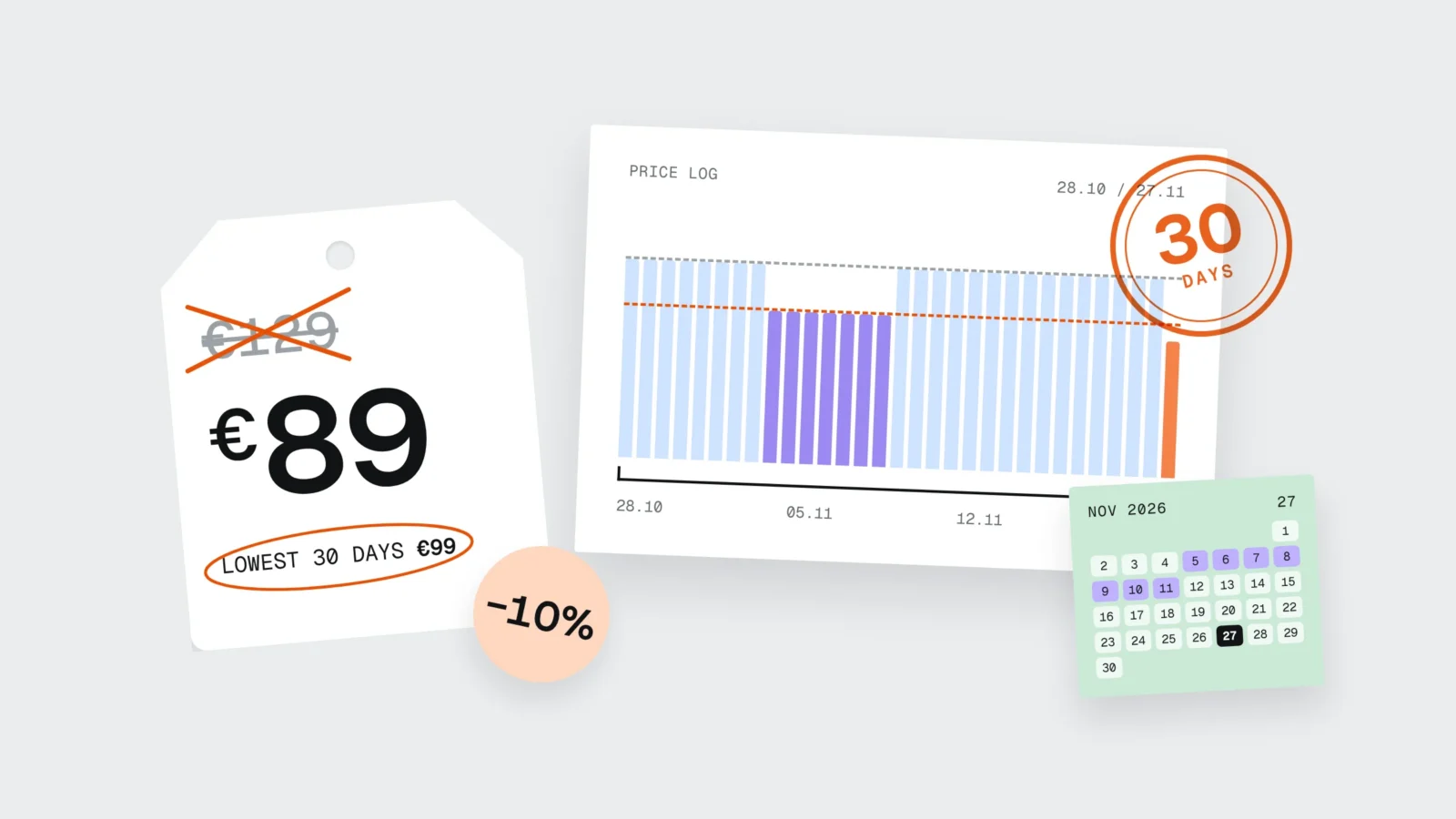
Suppose a sports equipment online store in Valmiera has 1,400 products, and 320 of them are in the Black Friday campaign from 27 to 30 November. From 5 to 11 November, 60 winter jackets were in a St. Martin’s Day promotion. One of them, a ski jacket, normally costs 129 €, sold for 99 € in the promotion and went back to 129 € on 12 November.
The campaign draft showed the jacket as “89 €, was 129 €, -31%”. The store used the WooCommerce “Regular price” field as the “was” price, which is correct for the 260 products whose price did not change in 30 days. For the 60 jackets it is wrong: between 28 October and 26 November the lowest price was 99 €, so the correct label is “89 €, lowest price in 30 days 99 €, -10%”.
The store had two options: keep 89 € and show an honest -10%, or give these jackets a bigger reduction. It chose 79 € (-20% from 99 €) for the 20 best-selling jackets and 89 € for the other 40. The homepage timer that counted 15 minutes for every visitor was replaced with the sentence “Offer ends 30.11 at 23:59”, and “only 2 left” now appears only when the warehouse really has 1-3 items.
The work took two working days: prices from the 28 October backup were exported to a spreadsheet, compared with the current ones, and 60 products were corrected. For future campaigns the store installed a plugin that keeps a price history.
How to set it up in WooCommerce
A WooCommerce product has “Regular price” and “Sale price” fields, and a sale can be scheduled with start and end dates. There is no “lowest price in 30 days” field out of the box, and the crossed-out price the theme shows is the regular price. You need a plugin that records every price change and shows the lowest price on the product.
The WordPress.org directory has two free ones: “Omnibus” by iworks (more than 10,000 active installations) and “Omnibus by iLabs”, which handles each variation separately and lets you mark perishable products. Both start recording prices when they are installed. If you install one today, 18 November, it will have only 9 days of history by Black Friday, so this year check the 30-day price against a backup or a price export, and keep the plugin for future campaigns.
After setup, open three places on a phone: a product page, a category list and one variation (size, colour). Many themes show only the crossed-out price in category lists, without the 30-day price. If the store sends a product feed to Google Merchant Center or AI shopping tools, it must carry the same sale price and dates, as explained in AI is shopping for your customers. Delivery, parcel locker and payment checks before the campaign are in our online store launch checklist.

Check before 27 November
- Export the list of campaign products with prices and compare it with prices on 28 October (backup, price export or plugin history).
- For products that were cheaper in the last 30 days, change the prior price to the lowest one and recalculate the percentage.
- For products that have been in the store for less than 30 days, look at the last 7 days.
- On a phone, open a product page, a category and one variation: is the 30-day price visible next to the sale price?
- For “up to X% off” banners, count whether the largest discount applies to at least 10% of the campaign products.
- Switch off timers that restart and “only N left” messages whose number does not come from stock.
- Put the end date and time in the banner and the terms, and do not extend the campaign after it ends.
What to do this week
- Prior price is the lowest price in the 30 days before the discount
- Percentages are calculated from the prior price
- The 30-day price is visible on the product page, in categories and on variations
- Products in the store for less than 30 days use the last 7 days
- “Up to X%” applies to at least 10% of campaign products
- The timer counts to one real end time, the same for everyone
- “Only N left” comes from stock records only
- The sale lasts no longer than a month and is not extended
Frequently asked questions
Can I write 'was 129 €' if the product cost 129 € for most of the month?
Not if it was cheaper at any point in the 30 days before the discount. If it cost 99 € for a week, the prior price is 99 € and the percentage is calculated from that. The Commission allows an additional reference price with a clear explanation, but a crossed-out 129 € looks like a discount to the shopper, so it is safer not to show it.
From which day are the 30 days counted?
Backwards from the day before the discount starts. If the sale starts on 27 November, you look at prices from 28 October to 26 November. In Latvia, a product that has been in the store for less than 30 days uses the last 7 days.
Does the 30-day rule apply to discount codes?
If the code is widely available, for example in a banner or in a newsletter to all subscribers, the Commission treats it as a price reduction and the rule applies. Personal codes, loyalty points and permanent customer discounts are outside it.
Are countdown timers allowed at all?
Yes, if the timer counts down to one real end time that is the same for everyone and the offer really ends at zero. A timer that restarts, shows each visitor a different time, or is followed by the same offer is prohibited.
What is the penalty for an incorrectly stated discount?
In Latvia price indication and unfair commercial practices are supervised by PTAC. The Unfair Commercial Practice Prohibition Law allows fines of up to 4% of annual turnover, and no more than 300,000 € if the practice took place only in Latvia. After its 2025 check PTAC said it would assess further action against infringers.
Does WooCommerce show the lowest 30-day price by itself?
No, the core plugin does not keep a price history. You need a plugin such as “Omnibus”, and it starts recording prices when installed, so for the first 30 days the lowest price has to be checked against a backup or an export.
If your campaign starts next week and the prices have not been checked
For online stores we compare campaign prices with the 30-day history, set up a WooCommerce plugin that shows the lowest price on product pages, categories and variations, and rework timers and banners so they match the PTAC guidelines. See our online store development page or tell us how many products are in the campaign and when it starts, and we will tell you how long the check will take. Phone: +371 25 640 062.
Sources
- Cabinet Regulation No. 178 on the indication of prices of goods and services (likumi.lv, in Latvian)
- PTAC: Guidelines on the indication of prices of goods and services (9 June 2026, No. 5, in Latvian)
- PTAC: Almost half of “Black Friday” discounts in e-stores were misleading (28 January 2026)
- European Commission: EU check reveals misleading sales practices online (26 March 2026)
- Court of Justice of the EU: Case C-330/23 Aldi Süd, press release No. 152/24 (26 September 2024)
- European Commission: Guidance on the interpretation and application of Article 6a of Directive 98/6/EC (OJ C 526, 2021)
- Unfair Commercial Practice Prohibition Law (likumi.lv, in Latvian)
- Arunesh Mathur et al.: Dark Patterns at Scale: Findings from a Crawl of 11K Shopping Websites (ACM CSCW, 2019)
- European Commission: Making your online experience fairer, Digital Fairness Act (11 November 2026)
- WordPress.org: Omnibus plugin (iworks)
- WordPress.org: Omnibus by iLabs plugin